AI Red Teaming Lab 7: BloodHound CE + MCP — AI-Driven AD Attack Path Analysis — a technical write-up
The final lab wires BloodHound CE into Claude Desktop through the BloodHound-MCP server,
exposing ~60 pre-built Cypher queries as MCP tools so the LLM performs natural-language Active Directory
attack-path analysis. The companion "AI Attack Reference" doc walks a full AI-assisted kill chain against
oco-ai.local (n8n recon → OSINT → Mythic phishing payload → BloodHound enumeration → Kerberoast
→ GenericAll on Domain Admins → DC access); this lab is the graph-analytic mirror — teaching the AI to
find exactly those misconfigurations.
EMP_USER holds GenericAll on the domain object (effective DCSync) — plus an ESC1-capable
certificate template.
EMP_USER@PWRGRID.MGMT confirmed to hold
GenericAll on the domain; the only SPN accounts confirmed as KRBTGT and the gMSA
(GMSA_SRV$); the ESC1-pattern templates confirmed (USER, CA, SUBCA, OFFLINEROUTER, CROSSCA,
DOMAINCONTROLLERAUTHENTICATION, KERBEROSAUTHENTICATION, DOMAINCONTROLLERSERVERAUTH); DC01 confirmed as the
only unconstrained-delegation computer.
Attack path (how the steps chain)
- Collect once, query forever — SharpHound DCOnly collection ingested into BloodHound CE turns the whole domain into a queryable graph (35 users, 81 groups, 5 computers, PWRGRID.MGMT + PCN.CTRL).
- Baseline tier zero — the AI confirms Domain Admins contains only the built-in RID-500 account, so any non-standard route to domain control stands out immediately.
- Find the shortest path — natural-language path queries surface the critical edge:
EMP_USER@PWRGRID.MGMT→ GenericAll → domain object (and a second quiet holder,BACKUP_ADM). GenericAll on the domain = DCSync rights. - Execute the compromise — one command finishes the chain:
secretsdump.py EMP_USER@dc01 -just-dcdumps every domain hash, including KRBTGT (golden ticket) and Administrator. One hop from a standard user to total domain compromise. - Parallel paths worth reporting — the ESC1-pattern USER template on AD-CS01 (enroll a certificate as any user, including Administrator) and Account Operators' GenericAll over most users give the operator backup routes if the primary edge is remediated.
- Dead ends verified, not assumed — Kerberoasting is legitimately empty (only SPN is a gMSA), no AS-REP roastable users, no password-not-required accounts — the AI proves the negative space too.
This lab is the analytic mirror of the course's full kill chain (n8n recon → OSINT → Mythic phish → BloodHound enumeration → domain dominance): here the AI's job is to find the exact misconfigurations the earlier labs would exploit.
1. Setup
1.1 BloodHound CE
tar -xzf bloodhound-cli-linux-amd64.tar.gz
sudo ./bloodhound-cli install    # UI on http://localhost:8080; save the initial admin password
⚠️ The shipped CLI is linux-amd64 — on macOS/Windows download the matching build
(bloodhound-cli-darwin-arm64, windows-amd64.exe) from the BloodHound CE releases;
everything else is identical. Docker needs ~4 GB RAM; verify docker ps shows
bloodhound, graph-db, app-db.
1.2 Ingest the dataset
Unzip Data to ingest in Bloodhound.zip — 13 SharpHound v2.12 JSONs, DCOnly collection for
PWRGRID.MGMT. In the UI: Administration → Data Ingest → File Ingest → upload all 13 → wait for
Complete. Sanity check: 35 users, 81 groups, 5 computers (DC01, OFFICE-MAC, DB-SRV, EXCH, AD-CS01).
1.3 MCP server + Claude Desktop
7z x Bloodhound_MCP.7z && cd BloodHound-MCP-AI-main
pip install -r requirements.txt    # neo4j, python-dotenv, mcp-server, fastmcp
Configure claude_desktop_config.json from the lab template — fix the uv path
(/snap/bin/uv only exists on the lab Ubuntu image; use which uv) and set env:
BLOODHOUND_URI=bolt://localhost:7687, user neo4j, password
bloodhoundcommunityedition (the Neo4j password, not the BH UI admin password — the classic
gotcha). Fully restart Claude Desktop; ~60 find_* tools should appear.
2. Analyst prompts and expected answers (from the actual dataset)
- Domain overview: PWRGRID.MGMT — 35 users, 81 groups, 5 computers (AD-CS01 is an enterprise CA). The ingest also contains a second domain object,
PCN.CTRL— worth asking the AI about. - Domain Admins (
find_all_domain_admins): only built-in ADMINISTRATOR (RID 500) — clean tier zero, so any non-standard path is suspicious. - Shortest path to DA — the key finding:
EMP_USER@PWRGRID.MGMThas GenericAll directly on the domain object = effective DCSync rights → one hop to total compromise (secretsdump.py EMP_USER@dc01 -just-dc). A cypher sweep shows a second, quieter account with the same edge:BACKUP_ADM@PWRGRID.MGMT. Also note Account Operators → GenericAll on most users (default, but a useful primitive).
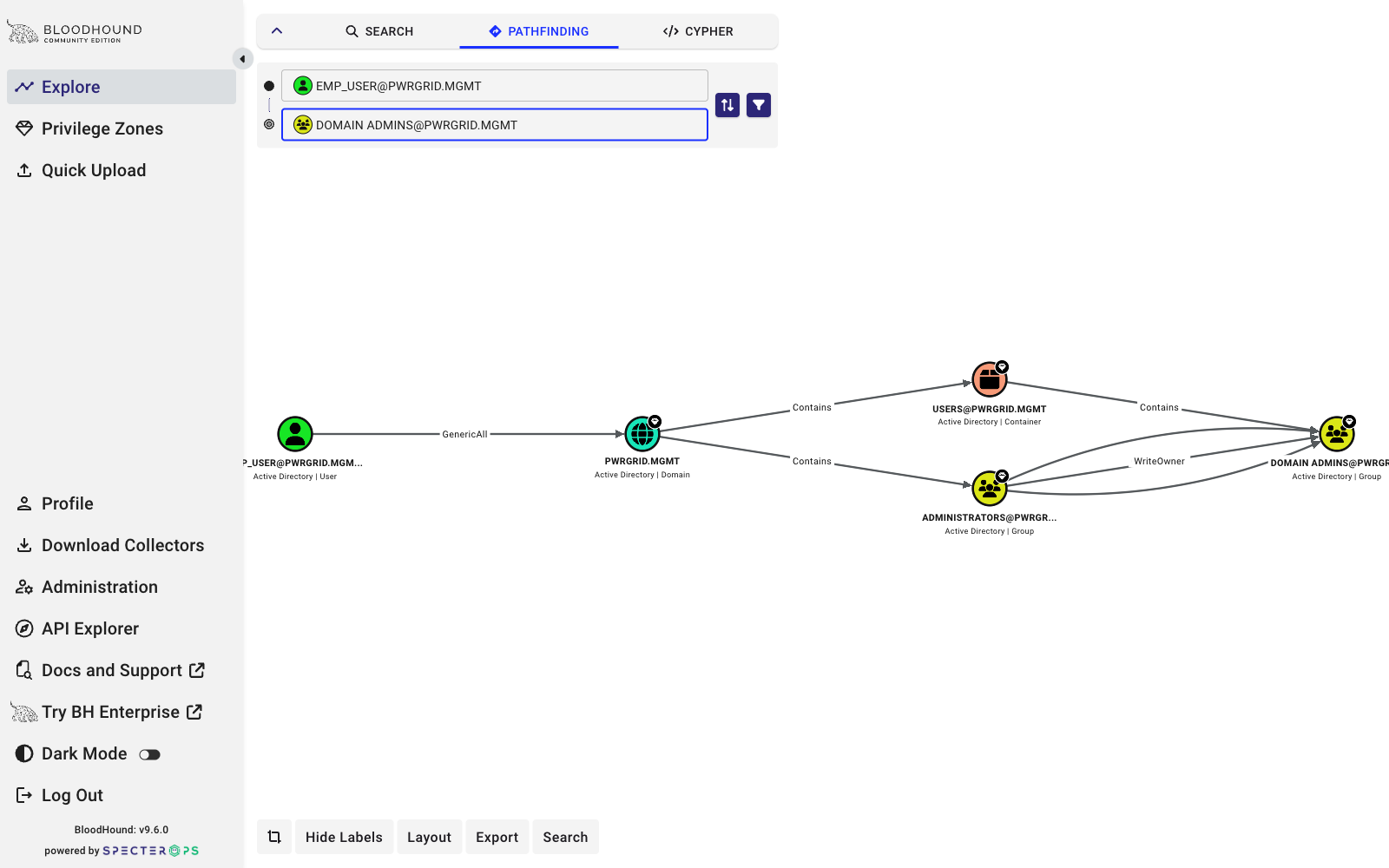
EMP_USER@PWRGRID.MGMT → Domain Admins: GenericAll on the domain object, then DCSync against DC01. Two hops to total compromise.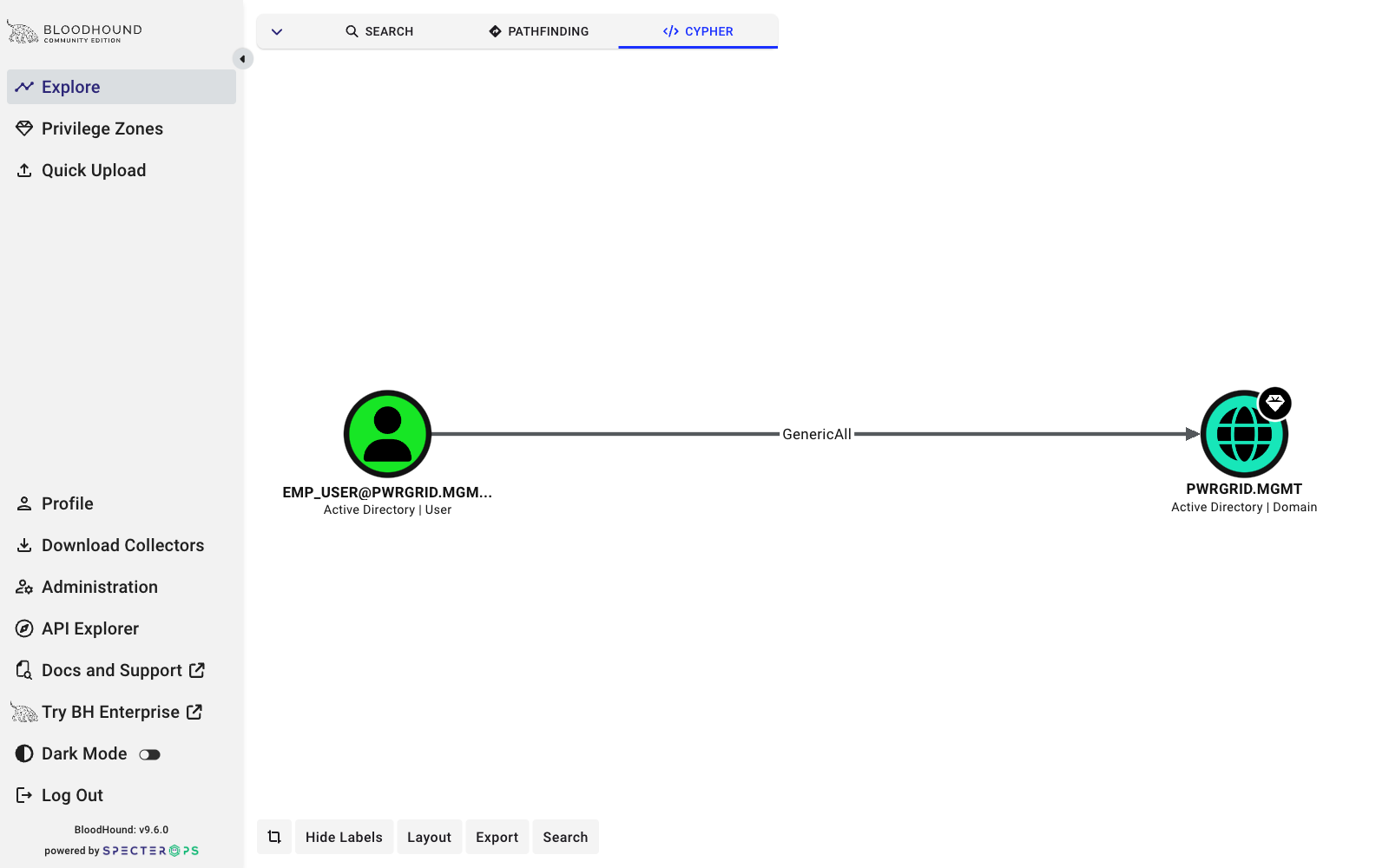
MATCH p=(u:User)-[:GenericAll]->(d:Domain) RETURN p: two accounts hold the critical edge — EMP_USER and BACKUP_ADM.- Kerberoastable users: empty — deliberately. The only SPN account is
GMSA_SRV$, a group Managed Service Account (120+ char machine-managed password), which every canned query excludes. Lesson: "no kerberoastable users" ≠ "no SPN accounts" — verify with raw CypherMATCH (u:User) WHERE u.hasspn=true RETURN u. - AS-REP roastable: none.
- AD CS: the default USER template matches the ESC1 pattern (enrollee supplies subject, client auth, no manager approval) — if Domain Users can enroll via AD-CS01, any user can mint a certificate as Administrator. ESC8 not indicated (
hasvulnerableendpointunset). - Delegation: only DC01 has unconstrained delegation (normal for DCs).
- Hygiene: 14 disabled accounts (all normal: KRBTGT, Exchange health mailboxes...), no password-not-required accounts.
- Executive report prompt: the AI should lead with (1) EMP_USER GenericAll-on-domain (critical), (2) ESC1-capable USER template (high), (3) Account Operators GenericAll (medium), (4) clean Kerberos posture.
3. Key code insights (BloodHound-MCP.py)
- Single-file FastMCP server over stdio; one shared Neo4j driver with
encrypted=False(BH CE's Neo4j has no TLS). - Dual-database fallback: every query tries
neo4jthenbloodhound— the fix for the classic "connects but returns nothing" bug. query_bloodhound(query)is a generic escape hatch for arbitrary Cypher — powerful, and worth flagging as a sensitive interface outside a lab.- Canned queries mirror the BH CE prebuilt-searches catalog (dangerous privileges, Kerberos, shortest paths, AD CS, NTLM relay, hygiene, plus an Azure/Entra section that returns empty on this on-prem dataset).
- RID-suffix filtering (
objectid ENDS WITH '-512') makes queries SID- and language-agnostic; every query has a LIMIT so the LLM context isn't flooded.
4. Troubleshooting
exec format error→ wrong bloodhound-cli architecture (the big one on Mac/Windows).- Server "running" but every tool errors → Neo4j password mismatch; test standalone with the env vars set.
- Ingesting the zip instead of the individual JSONs; renaming SharpHound files.
- Empty results misread as "broken" → DCOnly collection has no sessions/local-admin edges; kerberoastable is legitimately empty (gMSA).
- Port conflicts on 7687/7474/8080 with a local Neo4j.
- Claude config: fully quit Claude Desktop after editing; watch for the trailing comma in the lab's sample file.